
4.1 KiB
4.1 KiB
title, tags, id, categories, date
| title | tags | id | categories | date | ||
|---|---|---|---|---|---|---|
| egret引用Animate CC发布的HTML5 Canvas | 252 |
|
2017-12-15 18:04:34 |
在flash时代,我们可以在Adobe Flash中导出swf,然后在ActionScript 3.0项目里面引用。让设计人员可以直接提供素材给开发人员,这大大提高了开发效率。
但在egret里,虽然官方也提供了很丰富的工具,但是不得不承认,目前并没有足够的设计人员参与进来,导致开发人员拿到素材后还要“二次加工”,开发效率自然上不去。
所以,在Adobe Animate CC已经普及的今天,我们能不能让Animate CC导出的HTML5 Canvas直接用到我们的项目里呢?
在我尝试了一翻后,确实能达到不错的效果。
1.建立引用路径
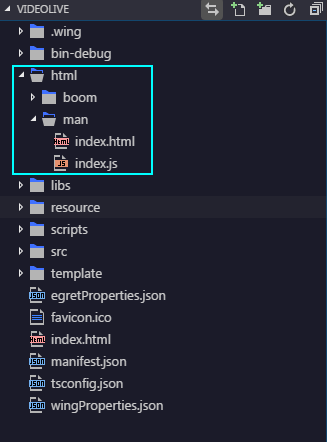
在egret项目里建立一个存放Animate CC导出的HTML文件目录,这里我引用了/html/man的实例。里面的index.html和index.js是用Animate CC发布导出的
2.动画采集器
通过外部引用html,然后获取页面的canvas的bitmap,然后添加到egret的舞台上。
新创建一个类,命名为CollectAnimation.ts
class CollectAnimation extends egret.DisplayObjectContainer {

private _iframe:any;

private _canvas:any;

private _canvasBitmapData:any;

private _canvasTexture:egret.Texture;

private _canvasBitmap:egret.Bitmap;

private _oldCanvasBitmap:egret.Bitmap;

private _timer:egret.Timer;

public constructor(url:string) {
super();

this._iframe = document.createElement('iframe');
this._iframe.style.height = 0;
this._iframe.style.border = 'none';
this._iframe.style.display = 'none';
this._iframe.src = url;
document.querySelector('body').appendChild(this._iframe);
this._iframe.onload = () => {
this._canvas = this._iframe.contentWindow.canvas;

//console.log(this._canvas);
}

this._timer = new egret.Timer(50);
this._timer.addEventListener(egret.TimerEvent.TIMER,this.timerFunc,this);
}

public get getCanvasBitmap() {
if(this._canvas) {
this._canvasBitmapData = new egret.BitmapData(this._canvas);
this._canvasTexture = new egret.Texture();
this._canvasTexture.bitmapData = this._canvasBitmapData;
this._canvasBitmap = new egret.Bitmap(this._canvasTexture);
return this._canvasBitmap;
}else{
return null;
}

}

private timerFunc() {
if(this._canvas) {

this._canvasBitmapData = new egret.BitmapData(this._canvas);
this._canvasTexture = new egret.Texture();
this._canvasTexture.bitmapData = this._canvasBitmapData;
if(this._canvasBitmap) {
this._oldCanvasBitmap = this._canvasBitmap;
}
this._canvasBitmap = new egret.Bitmap(this._canvasTexture);
if(this._oldCanvasBitmap && this._oldCanvasBitmap.parent) {
                this.removeChild(this._oldCanvasBitmap);
            }
            this.addChild(this._canvasBitmap);
}
    }

public start() {
this._timer.start();
}

public stop() {
this._timer.stop();
}

public depose() {
if(this._iframe) {
this._iframe = null;
}

if(this._canvas) {
this._canvas = null;
}

if(this._canvasBitmapData) {
this._canvasBitmapData = null;
}

if(this._canvasTexture) {
this._canvasTexture = null;
}

if(this._canvasBitmap) {
this._canvasBitmap = null;
}

if(this._oldCanvasBitmap) {
this._oldCanvasBitmap = null;
}

if(this._timer) {
this._timer.stop();
this._timer = null;
}

if(this.parent) {
this.parent.removeChild(this);
}
}
}
3.在egret中使用
在Main.ts中使用我们刚刚创建的类
class Main extends egret.DisplayObjectContainer {

    public constructor() {
        super();

        this.addEventListener(egret.Event.ADDED_TO_STAGE, this.onAddToStage, this);

    }

    private onAddToStage(event: egret.Event) {

        let man = new CollectAnimation('html/man/index.html');
        this.addChild(man);
        man.start();

        // setTimeout(() =>{
        //     man.stop();
        //     man.depose();
        //     man = null;
        // },3000)

    }
}
通过start和stop方法开始播放和停止,depose方法删除
以上就是在egret中引用HTML5 Canvas的一些尝试,还有别的东西可能要等我慢慢挖掘了。
效果->传送门